2019年2月21日星期四

Tips to Move iTunes Library to New Computer 2019


Tips to Move iTunes Library to New Computer
01 Using an External Drive

Using an external drive to transfer iTunes library to new computer is another way that can be considered, though it’s not recommended.

Step 1: Close iTunes on your old computer.

Step 2: Connect an external drive, like a USB stick, into the old computer.

Step 3: Look for the folder where your library backup is.


Mac: Go to “Finder” and then “Go > Home” from the menu bar. Double click on “Music” folder.


Windows: Go to “\Users\username\My Music\iTunes”.

Step 4: Copy and paste this iTunes folder to the external drive.

Step 5: After that, connect the external drive to your new computer and open it.

Step 6: Simply drag the iTunes folder from external drive to the Music folder (Mac) or “My Music” folder (Win) on new computer. to your new My Music folder. (Make sure that you’ve installed the latest version of iTunes first, though.)


Step 7: Open iTunes. iTunes will ask you to pick your library, so hit “Choose Library” on the dialog box.

Step 8: Look for the library that you just added by browsing for it.

There are a few limitations to this method, though:


Existing iTunes data on the new computer will be lost.


If some contents on your iTunes library are not in the same iTunes folder, you will lose media files or settings on your new computer.


The backup of iPhone/iPad/iPod was not included.
02 Using Home Sharing

Finally, home sharing is another way to move iTunes library to new computer, though it has more restrictions.

Restrictions:


You two computers should be in the same home network (wired or wireless).


Your iTunes on two computers should be signed in the same iTunes account.


This only allows the new computer to access the iTunes library on your old computer, so you need to keep the old computer open and its iTunes running. Or you cannot assess the old library on new computer.


Make sure that both old and new computers have the latest version of iTunes.

Step 1: Launch iTunes on your old computer, and then go to File, then Home Sharing and then “Turn on Home Sharing.”

Step 2: It will ask for your Apple ID and password. Put it in, then click “Create Home Share."
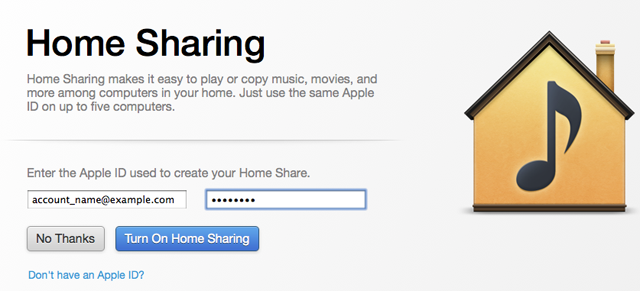


Step 3: On your new computer, hit “Account > Authorizations > Authorize This Computer” and enter the same Apple ID and password.

Step 4: Select the “Home Sharing” in the left sidebar. You will see all of your iTunes library from your old computer.

Step 5: Select contents that you want to move and click the “Import” button. Or you can click on “Edit > Select All” and click “Import” button. Then the contents will be moved to new computer.

However, sometimes it will be unable to turn on home sharing, or iTunes home sharing not working for random reasons.Sponsor ads:

Gihosoft Free iPhone Data Recovery:iphonerecovery.com

Free iPhone Data Recovery Software for Windows/Mac

Recover up to 12+ types of files, including contacts, SMS, photos, WhatsApp, Viber, notes, etc.

Restore lost data from iOS devices directly or from iTunes and iCloud backup

Recover iPhone data lost due to iOS upgrade/jailbreak, accidental deletion, device lost or broken

Support all the latest iPhone, iPad and iPod Touch

Both Free and Pro version.

If you lost data after you updated to a new iPhone, you can always use Gihosoft iPhone Data Recovery to get the data back from the old iPhone or backup.

Top 10 Best FRP Bypass Tools to Bypass Google Account on Android Device 2019

Worth reading:download youtube 1080p

If you use android phones, please choose Gihosoft Android Data Recovery

Jihosoft Android Data Recovery: the best Android Data Recovery software for Windows and Mac to recover deleted contacts, messages, photos, videos, WhatsApp and etc from Android 

2019年2月20日星期三

2019 Factory Reset the iPhone Without a Passcode Via iTunes


2019 Factory Reset the iPhone Without a Passcode Via iTunes

Please note that this solution will only work if you had synced the iPhone with iTunes in the past. There is a chance that iTunes could still remember your passcode and you may not have to re-enter it.

Step 1: Connect the device to your computer using USB cables and launch iTunes. Begin by backing up the data on the device because a factory reset will remove all data.

Also Read:10 Best Android File Transfer Apps to Transfer Data from Android to Android
Also Read:How to Recover Deleted Contacts with Gmail Account on AndroidAlso Read:How to Unblock Blocked Websites with 5 Methods 2019
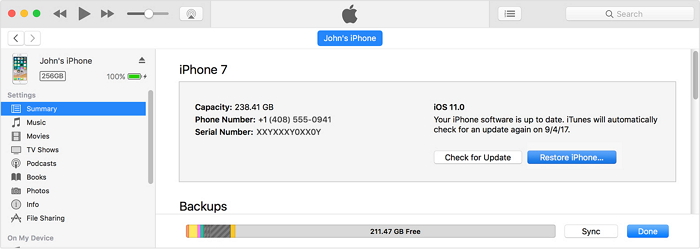
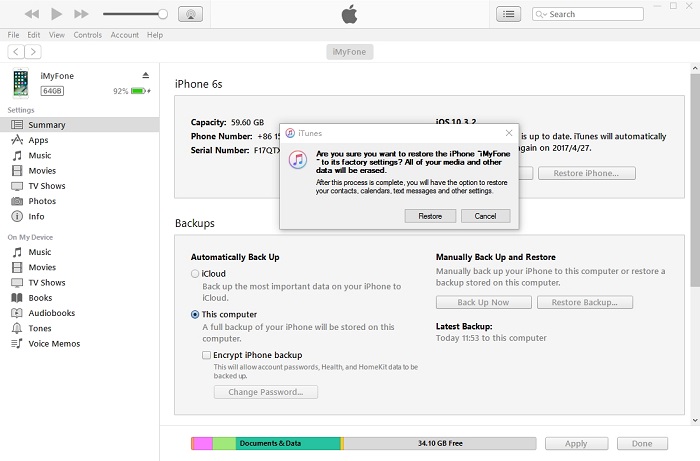
Step 2: Click on “Restore iPhone” and then click “Restore”.


Step 3: Click Restore again to confirm the process. This will let iTunes erase all your content and settings on your device.


Step 3: Click on “Next” in the software update window and then accept Apple Terms and Conditions by clicking on “Agree.”Must read:Youtube video downloader for pc 

Step 4: Now all you have to do is wait while iTunes downloads the iOS software and restores the device.

Sponsor ads:

Gihosoft Free iPhone Data Recovery:https://www.gihosoft.com/iphone-data-recovery-free.html

Gihosoft iPhone Data Recovery Free

Free iPhone Data Recovery Software for Windows/Mac

Recover up to 12+ types of files, including contacts, SMS, photos, WhatsApp, Viber, notes, etc.

Restore lost data from iOS devices directly or from iTunes and iCloud backup

Recover iPhone data lost due to iOS upgrade/jailbreak, accidental deletion, device lost or broken

Support all the latest iPhone, iPad and iPod Touch
Both Free and Pro version.

If you lost data after you updated to a new iPhone, you can always use Gihosoft iPhone Data Recovery to get the data back from the old iPhone or backup.You may also like: iphonerecovery.com

If you use android phones, please choose Gihosoft Android Data Recovery.

With Gihosoft Android Data Recovery, no longer afraid of data loss!
Gihosoft RePicvid Free Photo Recovery Software provides a free photo recovery software for windows to help users recover the deleted or lost photo for free.

Jihosoft Android Data Recovery: the best Android Data Recovery software for Windows and Mac to recover deleted contacts, messages, photos, videos, WhatsApp and etc from Android devices.Tips:How to transfer messages from iPhone to iPhone 
jihosoft Free iPhone Data Recovery

2019年2月19日星期二

3 Top Professional Forensic iPhone Data Recovery Services 2019


3 Top Professional Forensic iPhone Data Recovery Services

Another alternative for the recovery of lost iOS data is to use a professional forensic data recovery service. While these are more expensive, they may serve you better if you don’t want to do it yourself. Most of them may also require that you send in your device to them.
1. Elcomsoft iOS Forensic Toolkit

This is a more advanced software solution that you can use to not just recover lost data on your iOS device but also dig deeper and recover certain device secrets such as passcodes, passwords and encryption keys. While it is a software that you can download and use, it is a bit advanced for single users, more suited to corporate solutions.


2. Oxygen Forensics

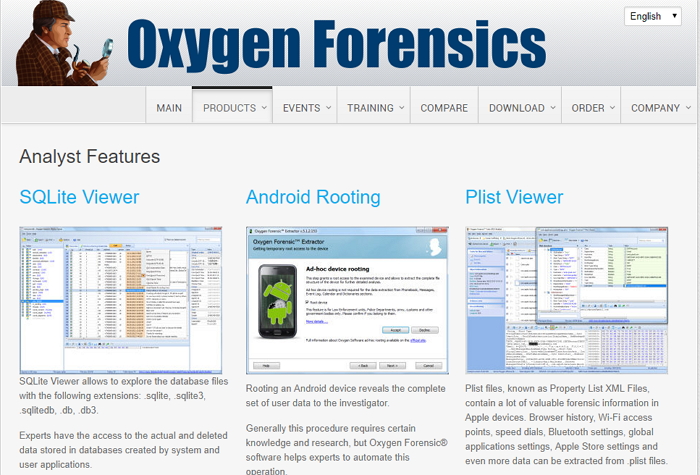
This is another data recovery software that provides an advanced data recovery service. It can be sued to extract anywhere from normal data such as photos and videos to passwords, passcodes and many other types of data. It also extracts data from iCloud or iTunes.


3. iPhone Analyzer

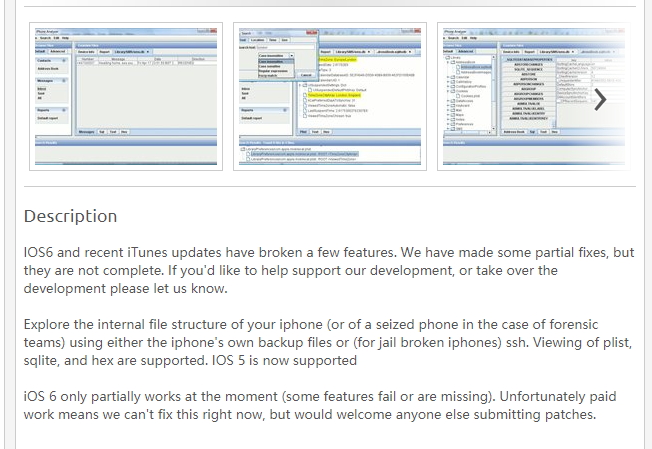
This is another iOS forensic data analysis tool that may help you recover lost data on your device. It can help recover all types of data from your iPhone even if the device has been jailbroken.


Sponsor ads:

Gihosoft Free iPhone Data Recovery:iphonerecovery.com

Free iPhone Data Recovery Software for Windows/Mac

Recover up to 12+ types of files, including contacts, SMS, photos, WhatsApp, Viber, notes, etc.

Restore lost data from iOS devices directly or from iTunes and iCloud backup

Recover iPhone data lost due to iOS upgrade/jailbreak, accidental deletion, device lost or broken

Support all the latest iPhone, iPad and iPod Touch

Both Free and Pro version.

If you lost data after you updated to a new iPhone, you can always use Gihosoft iPhone Data Recovery to get the data back from the old iPhone or backup.

Top 10 Best FRP Bypass Tools to Bypass Google Account on Android Device 2019

Worth reading:download youtube 1080p

If you use android phones, please choose Gihosoft Android Data Recovery


Jihosoft Android Data Recovery: the best Android Data Recovery software for Windows and Mac to recover deleted contacts, messages, photos, videos, WhatsApp and etc from Android

Honor 10 Lite update news: New OTA brings ViLTE and fixes various bugs 2019


Latest news

February 19, 2019: A new update is rolling out to the Honor 10 Lite in India as EMUI 9.0.1.149. The update is quite heavy, weighing in at 753MB and according to the changelog, you are getting ViLTE support that the company says enhances voice services via a high-quality video channel.

The same update also fixes issues where the system launcher would occasionally crash and the phone automatically switches to silent mode. The OTA is available as of this writing and if it hasn’t arrived on your device, it’s almost here.


Original article below:

For the latest software updates related to the Honor 10 Lite, we have your back. On this page, we’ve put together all important update news that you’d want to know about this handset, both minor and major Android OS upgrades.

From time to time, well also talk about unofficial updates from the massive Android developer community across the globe.
Honor 10 Lite update timeline


Date

EMUI & Android OS version

Changelog


19 Feb 2019

9.0.1.149 | Android 9

Installs EMUI 9.0.1.149 (C675E11R1P12) update with support for ViLTE and fixes for crashing system launcher and silent mode issues

Honor 10 Lite Android Q update


Eligible for Android Q update

Honor 10 Lite runs Android 9 Pie out of the box and unlike others before it, we expect at least two major OS upgrades beginning with Android Q. Of course, Q is guaranteed, but we cannot say the same for Android R, at least for now.

Related:

5 Top Message Locker Apps to Hide Text Messages on Android

How to Hide Root from the Apps like Snapchat, Pokémon Go on Android

How to Bypass Android Lock Screen with 3 Methods

4 Best Free WiFi Hotspot Apps for Android without Rooting 2019

How to Download Minimal ADB and Fastboot Tool (v.1.4.3) 2019

How to Crop Images into Circle Shapes


Jihosoft Photo Eraser

Erase unwanted objects and perfect your amazing photos!

Remove objects from photos with Photo Eraser is almost as easy as taking a shot. Now you can use this tool to erase undesirable objects from your pictures, such as tourists, watermarks, logos, texts, blemishes and other unwanted things without real photo-editing skills required at all.


Jihosoft Android Data Recovery

The most powerful and professional data recovery software for Android that can restore deleted or lost contacts, photos, videos, audios, SMS, call logs, WhatsApp chat, Viber messages from any Android devices due to accidental deletion, virus attack, formatting. It supports all popular Android smartphones and tablets like Samsung, HTC, LG, Huawei, Motorola, Nexus, etc. In the meantime, you will be guided step by step if you never used this kind of tool before.

Common iOS 10.3.1 Problems and Solutions 2019


The new iOS 10.3.1 update brings with it a lot of hug fixes and security upgrades. But a lot of peoples are already complaining about the problems they are facing with the new update. In this article, we will look at some of the most common problems with iOS 10.3.1 and provide you with easy troubleshooting solutions you can try.
01 Weird Battery Drain Issues

This is a common one and the solution is just as simple. Sometimes all you need to do is simply wait a few days for the upgrade to settle in and you should begin to see your battery life go back to normal.


02 Wi-Fi Issues

Did the upgrade result in broke Wi-Fi connections among other connectivity issues? Try unplugging the router for a minute before plugging it back in. You may also need to check that the router’s firmware is update.

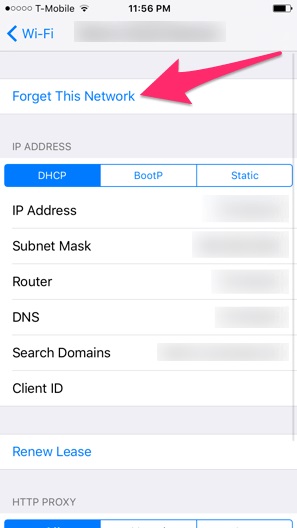
It may also be worth disconnecting the network causing problems and then reconnecting it. You can do this by going to Settings > Wi-Fi > Select the Connection > Forget this Network and then reconnect.


If all else fails, reset your network settings. To do this go to Settings > General > Reset > Reset Network Settings. You will need to re-join all networks once you’ve done this.


03 Touch ID Issues

If you’re having Touch ID issues, all you have to do is retrain the fingerprints. To do this go to Settings > Touch ID & Passcode > Enter your Passcode. Swipe from right to left on each fingerprint to delete them and then tap on “Add a Fingerprint” to re-train the Touch ID.


04 Busted Bluetooth

If you are experiencing Bluetooth issues there are some things that you can try. First, try forgetting the Bluetooth connection before reconnecting. To do this go to Settings > Bluetooth > Select the Connection and the tap “Forget this Device.” Try reconnecting to see if the problem is gone.

If that doesn’t work, you may want to reset your network settings like we did above to fix the Wi-fi issues. This will erase all Bluetooth, Wi-Fi and VPN connections and allow you to reconnect again.


05 Error Occurred While Installing iOS 10.3?

Sometimes when updating to the new iOS 10.3, you may see the message “Unable to Install Update- Error Occurred Installing iOS.” If you see this message, the best course of action is sometimes to wait just a few hours before attempting to re-install the update.

If a few hours later, the same message appears, read the following text for potential solutions.Sponsor ads:

Gihosoft Free iPhone Data Recovery:iphonerecovery.com

Free iPhone Data Recovery Software for Windows/Mac

Recover up to 12+ types of files, including contacts, SMS, photos, WhatsApp, Viber, notes, etc.

Restore lost data from iOS devices directly or from iTunes and iCloud backup

Recover iPhone data lost due to iOS upgrade/jailbreak, accidental deletion, device lost or broken

Support all the latest iPhone, iPad and iPod Touch

Both Free and Pro version.

If you lost data after you updated to a new iPhone, you can always use Gihosoft iPhone Data Recovery to get the data back from the old iPhone or backup.

Top 10 Best FRP Bypass Tools to Bypass Google Account on Android Device 2019

Worth reading:download youtube 1080p

If you use android phones, please choose Gihosoft Android Data Recovery

Jihosoft Android Data Recovery: the best Android Data Recovery software for Windows and Mac to recover deleted contacts, messages, photos, videos, WhatsApp and etc from Android 
Top 5 Music Apps for iPhone to Download FREE Music 2019


Top 5 Music Apps for iPhone to Download FREE Music
1 TopMusic.fm

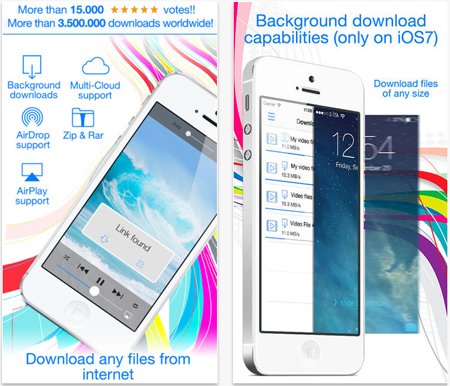
This is an extremely easy to use app that features a download manager as well as a file browser. It is simple and allows you to search the Internet for music files, and helps you download them in an organized fashion. It has a lot of other features as well. However users report that it’s a little bit buggy.

Also Read:Windows 10 File Sharing Methods You Should Know
Also Read:How to Retrieve Lost Password for iPhone Backup
Also Read:Top 8 Best Alternative Websites to MamaHD 2019


2 Total Downloader Free

This is an extremely easy to use app that features a download manager as well as a file browser. It is simple and allows you to search the Internet for music files, and helps you download them in an organized fashion. It has a lot of other features as well. However users report that it’s a little bit buggy.


3 Freegal Music

This is one of the most popular music downloading apps, and for good reason. It gives you access to millions of songs, and you can download music in several different formats. It will also help you rip music from videos. Overall, it’s one of the best apps out there for this purpose. One possible con, though, is that it uses the “freemium” model, so not everything is free. The basic version is free, however.


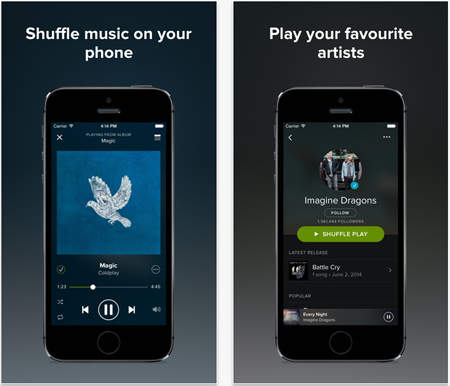
4 Spotify Music

Usually Spotify is more of a streaming app, but you can download music from it, too, under certain circumstances. It has a huge library of music, at any rate. One of the cons with this app, though, is that you usually have to pay to download music, which might kind of defeat the purpose for you.


5 iMusic Free

iMusic Free is a great music downloader that makes suggestions to you for new music to download. It also gives you a choice over millions of available songs. You can also look at what has been charting recently to decide. One negative point with this app though is that it can have trouble connecting to the Internet sometimes, and also there are bugs that can hinder playback.


You may also like:Sponsor ads:

Gihosoft Free iPhone Data Recovery:iphonerecovery.com

Free iPhone Data Recovery Software for Windows/Mac

Recover up to 12+ types of files, including contacts, SMS, photos, WhatsApp, Viber, notes, etc.

Restore lost data from iOS devices directly or from iTunes and iCloud backup

Recover iPhone data lost due to iOS upgrade/jailbreak, accidental deletion, device lost or broken

Support all the latest iPhone, iPad and iPod Touch

Both Free and Pro version.

If you lost data after you updated to a new iPhone, you can always use Gihosoft iPhone Data Recovery to get the data back from the old iPhone or backup.

Top 10 Best FRP Bypass Tools to Bypass Google Account on Android Device 2019

Worth reading:download youtube 1080p

If you use android phones, please choose Gihosoft Android Data Recovery

Jihosoft Android Data Recovery: the best Android Data Recovery software for Windows and Mac to recover deleted contacts, messages, photos, videos, WhatsApp and etc from Android

iOS 12 Changes: What’s New in iOS 12?


Advantages of Upgrading to iOS 12

Several advantages of using Apple's latest iOS have been recorded by iOS 12 users. We believe that you will get to enjoy these new iOS 12 changes, if you upgrade from your iOS 9 to the latest iOS 12. Here are some of the benefits why you need to upgrade to iOS 12 right now.
1 Siri

iOS 12 now have Siri, and app developers can design apps that are efficiently based on voice command like WeChat, Whatsapp, Slack, Facebook, etc. for better communication. Presently, almost 80% of iOS app developers are working on their apps to support Siri efficiently on iOS Devices.
2 Emoji in iMessages

There are always expressions that words cannot vividly converge. Hence, some of the emojis that describe your mode maybe needed during chat, and there is no better way of driving your point home apart from using emojis.
3 Delete Apple's Built-in Apps

iOS 12 offers users the privilege of deleting built-in-apps from Apple. Hence, you can create more iPhone storage space by deleting such apps if you are among the users that barely use some of the Apple's default apps.


4 Rootless Security System

iOS 12 offers better security protection than iOS 10 given this new security system. This system makes it impossible to jailbreak an iPhone or iPad, and makes it impossible for administrative users to access iDevice data when locked. However if not use iOS 12, you may need to permanently erase iPhone data to make sure that your deleted sensitive files won't seen by others.
5 Voicemail Transcription

Voicemail messages will henceforth be transcribed into words and saved on iCloud. This feature will help to inform the caller on your whereabouts and the reason why you can't pick his or her call at the moment, and the callers messages will be sent to you in text format.

Are these advantages not wonderful? Nonetheless, there are several other benefits of upgrading to iOS 12, which we cannot discuss in details within the scope of this article. Nevertheless, it is evident that iOS 12 will come with some possible limitations. Let us look at some of them.
Disadvantages of Upgrading to iOS 12

There are several limitations to iOS 12 performances and ultimate user satisfaction. Some of the disadvantages why iDevice users are double minded on upgrading to iOS 12 include:
1 Impossibility to Jailbreak iOS 12

It is expected that many users will downgrade to iOS 10 later due to the impossibility of such users to jailbreak their iDevices because of the rootless security system, which Apple just adopted. Hence, for users who always jailbreak their iPhones, this will be a huge challenge.
2 Supported iDevice

It is evident that with iOS 12, iPhone 4 variants users are locked out and are seen as obsolete iPhone users. Hence, no users of iPhone 4 will be allowed to upgrade to iOS 12.


3 Battery Life

There are many complaints from iOS 12 users on the inability for them to manage their iDevice battery life. Some have taken this issue online while seeking for available solutions.Sponsor ads:Schedule Text Messages on iPhone
4 Other issues

Other issues such as unresponsive touch screen, Game center, Bluetooth, notifications sound and Wi-Fi connect are experience by iOS 12 users, but these are expected to be corrected before iOS 12 final release.


Comparing iOS 12 vs iOS 10 is like preferring iPhone 5s over 6s. iOS 12 is a better brand of iOS 10, and we urge every iOS user who is not used to Jailbroken iPhone or users of iPhone 5s, to go for the upgrade. Nevertheless, it is very crucial to have good programs that can help you to reclaim your storage space back while using the numerous new apps and features that come with iOS 12. Download and install iMyfone Umate Pro today for better performance and experience with new iOS 12.Sponsor ads:

Gihosoft Free iPhone Data Recovery:iphonerecovery.com

Free iPhone Data Recovery Software for Windows/Mac

Recover up to 12+ types of files, including contacts, SMS, photos, WhatsApp, Viber, notes, etc.

Restore lost data from iOS devices directly or from iTunes and iCloud backup

Recover iPhone data lost due to iOS upgrade/jailbreak, accidental deletion, device lost or broken

Support all the latest iPhone, iPad and iPod Touch

Both Free and Pro version.

If you lost data after you updated to a new iPhone, you can always use Gihosoft iPhone Data Recovery to get the data back from the old iPhone or backup.

Top 10 Best FRP Bypass Tools to Bypass Google Account on Android Device 2019

Worth reading:download youtube 1080p

If you use android phones, please choose Gihosoft Android Data Recovery

Jihosoft Android Data Recovery: the best Android Data Recovery software for Windows and Mac to recover deleted contacts, messages, photos, videos, WhatsApp and etc from Android